How to get Windows Boot Time Duration
For diagnostic purposes you might get boot duration with simple script
Run as Administrator:
$log = 'Microsoft-Windows-Diagnostics-Performance/Operational'

# Check if the log is enabled
if (-not (Get-WinEvent -ListLog $log).IsEnabled) {
    Write-Host "The Diagnostics-Performance log is disabled. Enabling it now..."
    wevtutil set-log $log /enabled:true
    Write-Host "Please restart Windows so that boot events can be generated."
    exit
}

# Get the newest boot event (ID 100)
$evt = Get-WinEvent -FilterHashtable @{
    LogName = $log
    Id      = 100
} -MaxEvents 1 -ErrorAction SilentlyContinue

if (-not $evt) {
    Write-Host "No boot events found. The PC may not have been restarted since the log was enabled."
    exit
}

# Parse XML
$xml = [xml]$evt.ToXml()

# Extract values
$mainPath = $xml.Event.EventData.Data |
    Where-Object { $_.Name -eq 'MainPathBootTime' } |
    Select-Object -ExpandProperty '#text'

$postBoot = $xml.Event.EventData.Data |
    Where-Object { $_.Name -eq 'BootPostBootTime' } |
    Select-Object -ExpandProperty '#text'

$totalBoot = $xml.Event.EventData.Data |
    Where-Object { $_.Name -eq 'BootTime' } |
    Select-Object -ExpandProperty '#text'

# Output all three values
Write-Host "MainPathBootTime: $([int]$mainPath / 1000) seconds"
Write-Host "BootPostBootTime: $([int]$postBoot / 1000) seconds"
Write-Host "Total BootTime: $([int]$totalBoot / 1000) seconds"
Output:
MainPathBootTime: 57.925 seconds
BootPostBootTime: 53.095 seconds
Total BootTime: 111.02 seconds
Troubleshooting:
If Diagnostics-Performance log is not enabled this can be activated with
wevtutil set-log Microsoft-Windows-Diagnostics-Performance/Operational /enabled:trueand checked with
Get-WinEvent -ListLog *Diagnostics* | Format-Table LogName, IsEnabledDiagnostics
``` LogName | IsEnabled ------- Microsoft-Windows-Windows Firewall With Advanced Security/FirewallDiagnostics Microsoft-Windows-Provisioning-Diagnostics-Provider/ManagementService Microsoft-Windows-Provisioning-Diagnostics-Provider/AutoPilot Microsoft-Windows-Provisioning-Diagnostics-Provider/Admin Microsoft-Windows-ModernDeployment-Diagnostics-Provider/ManagementService Microsoft-Windows-ModernDeployment-Diagnostics-Provider/Diagnostics Microsoft-Windows-ModernDeployment-Diagnostics-Provider/Autopilot Microsoft-Windows-ModernDeployment-Diagnostics-Provider/Admin Microsoft-Windows-MemoryDiagnostics-Results/Debug Microsoft-Windows-Diagnostics-Performance/Operational Microsoft-Windows-Diagnostics-Networking/Operational Microsoft-Windows-Diagnosis-ScriptedDiagnosticsProvider/Operational Microsoft-Windows-DeviceManagement-Enterprise-Diagnostics-Provider/Sync Microsoft-Windows-DeviceManagement-Enterprise-Diagnostics-Provider/Operational Microsoft-Windows-DeviceManagement-Enterprise-Diagnostics-Provider/Enrollment Microsoft-Windows-DeviceManagement-Enterprise-Diagnostics-Provider/Autopilot Microsoft-Windows-DeviceManagement-Enterprise-Diagnostics-Provider/Admin Microsoft-System-Diagnostics-DiagnosticInvoker/Operational ```Alternatively you can create simple Rust Program, which will measure time from the start of GetTickCount:
use std::fs::OpenOptions;
use std::io::Write;
use windows_sys::Win32::System::SystemInformation::GetTickCount64;

fn main() {
    // Read time in milliseconds
    let time_ms = unsafe { GetTickCount64() };
    let time_s = time_ms / 1000;

    // Get current local time as timestamp
    let now = chrono::Local::now();
    let timestamp = now.format("%Y-%m-%d %H:%M:%S").to_string();

    // Prepare log line
    let line = format!("{} | {} s\n", timestamp, time_s);

    // Append to boot-time.log
    let mut file = OpenOptions::new()
        .create(true)
        .append(true)
        .open("boot-time.log")
        .expect("Unable to open log file");

    file.write_all(line.as_bytes())
        .expect("Unable to write to log file");
}
Cargo.toml:
[package]
name = "r-boot-time"
version = "0.1.0"
edition = "2024"

[dependencies]
chrono = "0.4.45"
windows-sys = {
    version = "0.61.2",
    features = [
        "Win32_System_SystemInformation"
    ]
}
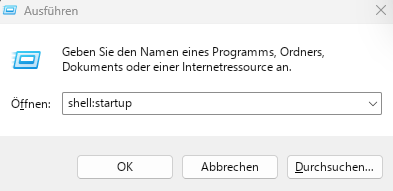
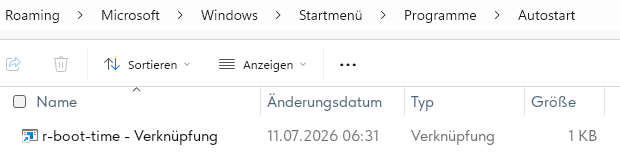
And put it to atostart:
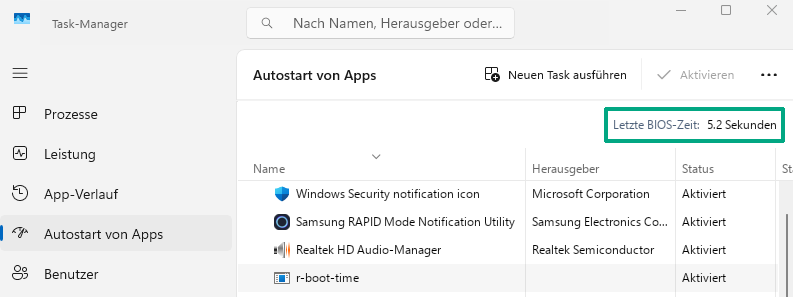
Also take a note that you can take BIOS time from Task Manager (but this is just BIOS, not overall boot time):