How to obtain CPU information
A very basic article about CPU Information.
You can obtain information about your CPUs in many different ways. One most popular is to use CPU-Z software.
This is how it looks on my ancient PC:
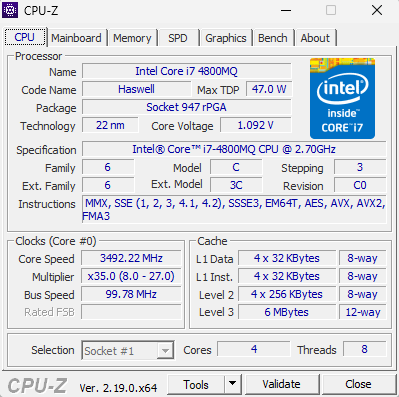
Lets break down.
🧠 1. Processor Identification (Name, Code Name, Package, Technology) #
Processor Name #
Intel Core i7‑4800MQ @ 2.70 GHz This is a mobile quad‑core CPU from Intel’s Haswell generation (4th gen Core series). The “MQ” means:
- M = Mobile
- Q = Quad‑core
Code Name: Haswell #
Haswell is Intel’s 4th‑generation Core architecture (2013). It introduced:
- Better power efficiency
- AVX2 and FMA3 instructions
- Improved integrated GPU
- Higher IPC (instructions per cycle) vs Ivy Bridge
Package: Socket 947 rPGA #
This CPU uses a removable laptop socket (rare today).
- rPGA = “reversible Pin Grid Array”
- Means the CPU is physically socketed, not soldered (unlike modern BGA CPUs).
Technology: 22 nm #
This is the manufacturing process size. Smaller = more efficient and faster. 22 nm was cutting‑edge in 2013.
⚡ 2. Core Voltage #
0.884 V
This is the real‑time voltage the CPU is using at that moment. Lower voltage = lower heat and power draw. It changes constantly depending on:
- Load
- Power plan
- Turbo Boost state
🧩 3. Specification Line #
Intel(R) Core(TM) i7‑4800MQ CPU @ 2.70GHz
This is the official model name. The base clock is 2.70 GHz, but Turbo Boost allows much higher speeds.
🧬 4. Family / Model / Stepping / Revision #
These are internal identifiers used by Intel and software:
- Family: 6
- Model: 60
- Stepping: 3
- Revision: C0
They describe the exact silicon version. Useful for:
- BIOS compatibility
- Microcode updates
- Overclocking/undervolting stability
🧮 5. Instruction Sets #
Your CPU supports:
- MMX – old multimedia instructions
- SSE 1/2/3/3S/4.1/4.2 – vector math
- SSSE3 – enhanced SIMD
- EM64T – 64‑bit support
- AES – hardware encryption acceleration
- AVX & AVX2 – wide vector instructions (big performance boost in modern apps)
- FMA3 – fused multiply‑add (great for scientific workloads)
These determine what modern software your CPU can run efficiently.
🚀 6. Clocks (Core Speed, Multiplier, Bus Speed) #
Core Speed: ~3492 MHz #
This is the actual real‑time clock speed. Your CPU is running at 3.49 GHz, which is above the base 2.7 GHz — this is Turbo Boost in action.
Multiplier: x35.0 (8.0 – 27.0) #
The multiplier determines the final clock speed:
Clock Speed=Bus Speed×Multiplier
Your CPU is using:
- Bus Speed ≈ 99.78 MHz
- Multiplier = 35
99.78×35≈3492 MHz
The range 8–27 is the base multiplier range. Turbo Boost allows higher multipliers (like 35) temporarily.
Bus Speed: 99.78 MHz #
This is the base clock (BCLK). Intel CPUs typically use ~100 MHz.
🧱 7. Cores and Threads #
- Cores: 4
- Threads: 8 (via Hyper‑Threading)
Each physical core can run 2 threads simultaneously. This improves multitasking and parallel workloads.
🧩 8. TDP (Thermal Design Power) #
47 W
This is the maximum heat the cooling system must dissipate. For a laptop CPU, 47 W is relatively high — meaning:
- Stronger performance
- Higher heat output
- Requires decent cooling
🗄️ 9. Cache Hierarchy #
L1 Cache #
- 4 × 32 KB Data
- 4 × 32 KB Instruction
- 8‑way associative
Each core has its own L1 cache. Fastest memory in the CPU.
L2 Cache #
- 4 × 256 KB
- 8‑way associative
Each core also has its own L2 cache. Slower than L1 but larger.
L3 Cache #
- 6 MB shared
- 12‑way associative
Shared among all cores. Helps with multi‑threaded workloads.
Cache associativity is one of those topics that sounds abstract until you understand why it exists — and once you do, the whole CPU cache system suddenly makes a lot more sense. Let’s break it down clearly and deeply, using your CPU’s L1, L2, and L3 caches as concrete examples.
🧠 What “Associativity” Actually Means #
A CPU cache is divided into sets, and each set contains a number of ways (slots). When the CPU needs data, it checks a specific set — and the number of “ways” determines how many different memory blocks can live in that set.
So:
8‑way associative = each set can hold 8 different cache lines
12‑way associative = each set can hold 12 different cache lines
This is crucial because it determines how often data gets evicted (kicked out) when new data arrives.
🧩 Why Associativity Exists #
Without associativity, caches would be:
Direct‑mapped (1‑way) → extremely fast but constantly evicting data
Fully associative (infinite ways) → ideal but too slow and expensive to build
So CPU designers choose a middle ground: N‑way set associativity.
More ways = fewer conflicts = better performance.
🗄️ Applying This to this CPU #
This CPU has:
L1: 8‑way associative
L2: 8‑way associative
L3: 12‑way associative
Let’s break down what that means for each level.
⚡ L1 Cache — 8‑Way Associative What it means: Each L1 set can store 8 different cache lines.
Why 8 ways? L1 must be:
extremely fast (accessed every cycle)
small (32 KB per core)
low latency
8 ways is a sweet spot:
Enough to avoid constant evictions
Still fast enough to check all 8 ways in parallel
Result: L1 hits are extremely fast — around 4 cycles.
⚙️ L2 Cache — 8‑Way Associative L2 is also 8‑way, but much larger (256 KB per core).
Why keep the same associativity? L2 is slower than L1, but still per‑core
8 ways keeps conflict misses low
Checking 8 ways is still fast enough for L2 latency (~12 cycles)
Result: L2 acts as a “backup” for L1 with fewer evictions.
🏢 L3 Cache — 12‑Way Associative (Shared) L3 is:
6 MB total
shared across all cores
inclusive (contains copies of L1/L2 data)
Why 12 ways? Because L3 is shared, many cores compete for space. Higher associativity reduces:
Conflict misses between cores
Thrashing during multitasking
Cache pollution from background tasks
12 ways is a balance between:
Good hit rate
Reasonable lookup time
Manageable hardware complexity
Result: L3 is slower (~30–40 cycles) but much more flexible and resistant to eviction.
🧠 Why Higher Associativity Helps #
Imagine a bookshelf with only 1 slot per category (direct‑mapped). If two books belong to the same category, one must be removed.
Now imagine 8 slots per category (8‑way). You can store 8 books before anything gets kicked out.
More ways = fewer evictions = better performance.
📉 Downsides of High Associativity #
Why not make everything 32‑way?
Because:
More ways = more hardware = more power
Checking many ways takes longer
L1 must be extremely fast, so it can’t afford too many ways
This is why:
L1 = 8 ways
L2 = 8 ways
L3 = 12 ways
Each level balances speed vs. flexibility.
🧩 Summary Table
| Cache Level | Size | Associativity | Purpose | Why This Associativity? |
|---|---|---|---|---|
| L1 | 32 KB (per core) | 8‑way | Ultra‑fast, first lookup | Fast enough to check 8 ways, low conflict rate |
| L2 | 256 KB (per core) | 8‑way | Backup for L1 | Larger but still per‑core, 8 ways is optimal |
| L3 | 6 MB (shared) | 12‑way | Shared last‑level cache | Needs high associativity to avoid conflicts between cores |
🧠 Final Takeaway #
Associativity determines how flexible a cache is when storing data.
More ways → fewer evictions, better hit rate
Fewer ways → faster but more conflict misses
Your CPU uses:
8‑way for fast per‑core caches
12‑way for the large shared L3
This is a well‑balanced design for a high‑performance mobile CPU like the i7‑4800MQ.
🧠 Summary: What This All Means for You #
Your Intel i7‑4800MQ is a high‑performance 4‑core Haswell laptop CPU with:
- Strong single‑core turbo (up to ~3.7 GHz)
- Good multi‑threading (8 threads)
- Modern instruction sets (AVX2, FMA3)
- Decent 6 MB L3 cache
- Socketed design (rare today)